
Wix or Squarespace looks manageable, Webflow offers more design control, and Lovable can generate something from a description. Then a developer sends you a proposal, and the quote can look hard to justify next to a tool you could open this afternoon.
It is a reasonable question. For a small website with straightforward requirements, doing it yourself can make sense. But the subscription price and the speed of generating a homepage only tell you part of what you are taking on.
Someone still has to understand the business, organise the content, connect the forms, check the result and keep it working. Hiring a developer changes who carries that work. It does not necessarily change the platform.
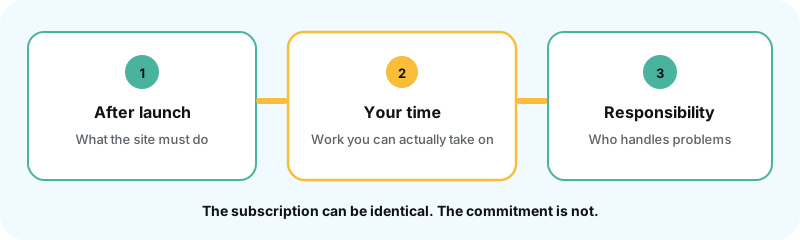
Choose based on what the website needs to do after launch, how much work you can realistically take on, and who will be responsible when something needs attention.
Understand the tools before comparing the options
Website builders now cover several different ways of working. Some begin with a visual editor, others with an AI conversation, and increasingly they combine both.
That distinction matters because building the first version is only one part of the experience. You will also need to change services, publish examples, update forms and perhaps hand the website to someone else.
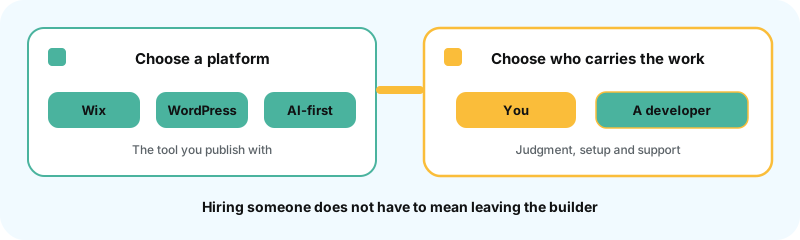
Editor-first platforms give you an established system
Wix, Squarespace and Webflow have become capable platforms for business websites. They provide visual tools for working with layouts, content and styling, while handling hosting, publishing and much of the infrastructure underneath.
That convenience is valuable. You do not need to assemble every part of the system before you can start using it.
Each platform also brings its own approach to development. It decides how content is organised, how components behave, which integrations are available and how far you can modify the underlying functionality. Customer management may be built in or connected to an external CRM.
For a business that fits those workflows, this can work very well. The limitations become more relevant when you need something unusual: a particular quoting process, different permissions for different customers, or an integration with software the platform does not readily support.
Customisation is possible. Wix Studio supports frontend and backend development, Webflow provides APIs and development tools, and Squarespace allows certain code-based modifications. But you are still extending a platform whose underlying rules you do not control.
A developer’s job includes recognising when those rules are a useful constraint and when working around them will become expensive.
WordPress gives you more room to extend the website
WordPress offers its native block editor alongside visual builders such as Elementor, Bricks, Divi, Breakdance and Oxygen. These tools have their own approaches too. A layout built in one does not automatically become editable in another.
The additional flexibility comes from WordPress underneath them. Its plugin and theme architecture lets developers add custom content types, integrations and functionality beyond the controls available in a particular builder.
For example, a business could use a visual editor for its service pages while a custom feature handles a specialised enquiry process. The whole website does not need to become a bespoke application because one requirement is unusual.
That freedom comes with responsibility. Someone needs to manage hosting, caching, software updates, backups, security, image optimisation and compatibility between the components. WordPress’s performance guidance explains how those choices affect the result.
Managed hosting and a maintenance agreement can handle much of this for you. The work still needs an owner.
This is the practical tradeoff: hosted builders make more infrastructure decisions on your behalf; self-hosted WordPress gives you more control over those decisions. Neither arrangement removes the need for a well-built website.
AI-first builders change how you give instructions
Tools such as Lovable and Bolt begin closer to a conversation. You describe the website or application, review what appears and request changes. They can generate functionality as well as layouts, which makes them useful for exploring an idea or producing an initial implementation. Bolt’s documentation describes this workflow.
The experience after that first generation deserves attention. Some changes can be made directly, while others require another prompt or work in the code. How much visual control you have depends on the product.
Lovable, for example, supports selecting elements, editing text inline and annotating changes through its preview toolbar. It would be inaccurate to say AI-first tools have no editing interfaces. They simply do not all provide the same kind of direct control as an established visual builder.
Before committing, try a few ordinary tasks: add a service, change a form, publish a project and fix a mobile layout. Those tasks will tell you more about maintaining the website than the first demonstration will.
Hiring a developer can include builders and AI
Developers use established platforms because those platforms already solve useful problems. Some specialise in one tool and know its capabilities, limitations and workarounds particularly well. Webflow’s Certified Partner directory is one example of that professional ecosystem.
For a normal business website, rebuilding every standard feature from scratch often adds work without adding enough value. Custom code should solve a requirement, not serve as proof that the developer did something difficult.
The same applies to AI. Editor-first products are already incorporating it: Wix Harmony combines prompting with visual editing, Webflow generates editable site foundations, and Squarespace offers Blueprint AI. Their approaches are documented by Wix, Webflow and Squarespace.
WordPress builders are developing AI workflows too. Elementor and Divi provide AI features, while Oxygen advertises an MCP-enabled release in beta at the time of writing. Support varies, and extending AI across an established product takes time.
External assistants can also work with existing sites through connections such as MCP, which lets an assistant use capabilities exposed by another tool. Novamira provides broad WordPress development access, intended for reviewed work in development and staging environments. My own Skylit.DEV workflow organises supported WordPress content and development files for people and agents, alongside visual editing in Gutenberg.
Webflow’s MCP server and Webstudio’s MCP workflow provide further examples of agents working on projects that remain visually editable.
You do not need to understand all those connections before commissioning a website. You need to know that hiring a developer can give you their experience and the benefits of modern tools together.
Business owners already combine platforms with professional help
Research on business owners supports keeping these two decisions separate.
In an August 2025 survey of 406 US small-business owners, Clutch reported that 41% used no-code builders such as Wix or Squarespace, 34% used what it categorised as low-code platforms such as WordPress or Shopify, and 12% used full-code custom development.
Separately, 45% reported hiring an agency and 9% a freelancer or consultant. The report does not cross-reference those answers by platform, but it shows that established software and professional services both play substantial roles. Although the article was updated in April 2026, these remain 2025 survey findings. Clutch’s report and methodology
A smaller survey of 475 online business owners in 2026 reported the following platform use:
| Platform | Share of surveyed owners |
|---|---|
| Squarespace | 33% |
| Self-hosted WordPress | 18% |
| Showit | 16% |
| WordPress.com | 8% |
| Wix | 4% |
| Webflow | 2% |
These selected results come from The Ordinary Business’s 2026 survey. The audience was predominantly US-based solo service businesses, so the figures describe that group rather than global market share. They also measure current use, not only websites started in 2026.
There is no comparable breakdown here for Lovable or Bolt. We should not turn that gap into a claim that nobody uses them, or replace it with statistics about developers’ coding assistants.
For this decision, the useful finding is straightforward: buying an established platform and hiring someone to implement it are both normal parts of creating a business website.

When doing it yourself is a sensible choice
Imagine you are testing a new service. You need a homepage, a clear explanation of the offer, a little evidence that you know the work and a reliable way to contact you.
There is one location, a small amount of content and no unusual integration. You have time to learn the tool, and you are willing to keep the scope under control.
I would not invent a reason that this must become a large development project. A builder may be enough.

A small, clear offer
A homepage, a short explanation, some evidence and a working contact path.
Time to learn the tool
You can sit with it, make ordinary edits and keep the scope under control.
A definition of finished
Give yourself a deadline. Check the phone layout, submit the form and confirm delivery.
A plain-language test
Ask someone unfamiliar with the business whether they understand the offer.
The calculation changes when the project expands. You add several services, different audiences, a quotation process, CRM routing and an ongoing content programme. You are now making more decisions about how the business operates through the website.
Several services and audiences
Each one needs a clear path, not another generic page that says the same thing.
Quoting, CRM or unusual rules
Any one feature might exist in the platform. The work is getting them to function together.
You cannot confidently finish
Liking the tool is not the same as being able to ship a working website on it.
Months in, still not launched
That is usually a better point to get help than waiting until the unfinished work is hard to unwind.
Any individual feature might be available in your chosen platform. The work is getting them to function together sensibly.
That is usually a better point to assess professional help than waiting until you have spent months building something that is difficult to finish.
Count the time you are committing, not just the subscription
A tool can generate a service page. It cannot know which service is most profitable, which enquiries waste your team’s time or which customer questions you answer every week unless someone supplies that context.
The tools do not read minds. A longer prompt does not help much if the important business decisions are still missing.
Consider a company that receives both domestic and commercial enquiries. A generic contact form might collect a name, email and message. A more useful setup could identify the type of enquiry, request the right information, record its source and send it to the correct person.
The builder may already support everything required. Someone still has to define the process, configure it and test what happens when a submission fails.
The same applies to content and search visibility. A settings panel can help you write page titles, but it does not decide whether several services need separate pages or what evidence will help a visitor choose you.

If you handle this yourself, the cost includes the learning, revisions and troubleshooting. It also includes whatever business work waits while you do it. For budget ranges, I have a separate guide to small-business website costs.
I explored the time decision in the three groups of owners approaching AI websites. Some want to learn and become capable. Others keep generating alternatives without knowing how to judge them. Others hire help so they can keep running the business.
The subscription can be the same in all three cases. The commitment is very different.
What a good developer should actually take off your plate
The first useful thing a developer does is help turn what you know about the business into something that can be built.
You should expect questions about goals, services, products, audiences, existing systems and the way customers move from interest to enquiry or purchase. A good developer also asks who will maintain the content and what the business is likely to need next.
You should not have to arrive with a finished technical specification.
For a straightforward website, one or two focused meetings can often establish enough to prepare a useful scope. More complex integrations or business rules need further discovery. The scope should make that distinction clear and explain the proposed structure, functionality, responsibilities and assumptions.
From there, experience should improve the decisions. You ask for a long quote form, and the developer notices that customers cannot answer half the questions before speaking to you. You request a custom feature, and they identify an existing integration that would be easier to maintain.
Human feedback and collaboration matter because requirements rarely arrive complete. Someone needs to challenge assumptions, explain consequences and help you choose an approach you understand.
AI can assist with that process. A professional relationship also gives you a person who knows the project history and is responsible for the agreed delivery.
Responsibility is part of what you are buying
You still supply information, review proposals and approve the direction. But you should no longer be the person investigating every broken layout or unfamiliar integration error.
If the agreed form does not deliver, there is someone responsible for finding out why. If the implementation differs from the approved scope, there is a process for correcting it.
That is where peace of mind becomes concrete. You know what has been checked, who handles problems and how changes will be managed.
After launch, support needs a clear agreement. Hiring a developer does not automatically buy permanent availability, copywriting, ongoing SEO or every future feature. A good professional will explain what is covered and identify work that requires another specialist.
The person you choose matters as much as the platform. My guide to hiring a web developer covers those checks.
Decide what happens when the business changes
Before committing to a platform, look beyond the launch. You may want to introduce another service, connect different software, change the editing workflow or move to another provider.
Hosted builders can make daily operation convenient while limiting how much of the complete system you can take elsewhere. Wix cannot simply be moved to another host, and Squarespace exports selected content rather than the whole working website. Their documentation explains those boundaries: Wix and Squarespace.
WordPress generally gives you more control over files, data and hosting. You can still face rebuilding work when changing visual builders or replacing integrations.
AI-first platforms vary too. Lovable documents code ownership, data portability and external hosting, along with the responsibilities you take over when leaving its managed environment. Lovable’s ownership guidance makes that distinction clear.
Ownership, export and ease of migration are related, but they are not identical. An exported database or code repository is useful only if someone can turn it into a working, maintainable setup.
I cover this more fully in my WordPress article. If a move is already necessary, treat it as a redesign or rebuild scope rather than assuming an export button will finish the job.
Choose around the work your business needs
A builder can be enough when the requirements are simple and you can take responsibility for the result. Professional help becomes more valuable as the decisions, dependencies or demands on your time increase.
| If this describes your situation | The sensible next step |
|---|---|
| You need a few straightforward pages to test an offer | Keep the scope small and build it yourself |
| You like the platform but cannot confidently finish the site | Hire someone experienced with that platform |
| Several services and audiences need clear enquiry paths | Get help with structure and implementation |
| You need custom quoting, integrations or unusual business rules | Have a developer assess the requirements |
| You want visual editing and AI-assisted updates | Include both in the project scope |
| You want control over hosting, data and future development | Assess portability and ongoing maintenance together |
| You do not want to manage technical upkeep | Agree who will provide support after launch |
Hiring pages, multilingual publishing, structured content and search do not automatically require everything to be custom-coded. Established platforms can support many of those needs. The value of professional help is knowing which combination will work reliably and how to put it together.
A good developer makes the website easier for the business to run. That includes choosing suitable tools, doing the detailed work and leaving clear responsibility for what happens next.
My web development work starts with understanding those requirements and preparing a scope you can assess. The appropriate solution may be an existing builder, WordPress with selected extensions or custom functionality where the business needs it.
Frequently asked questions
Can I start on a website builder and move later?
Yes, but check what can be exported. Content, design, code and backend functionality may have different limitations. Some moves preserve much of the implementation; others involve rebuilding the website around content you can reuse.
Is a website builder cheaper than a developer?
Doing it yourself usually requires less upfront spending. The total comparison includes your time, additional services, revisions and maintenance. Hiring a developer may still involve paying for the same builder or platform.
Can a developer build on Wix, Squarespace or Webflow?
Yes. Developers and agencies use these platforms professionally, and some specialise in one. You can hire someone to plan, build, integrate and maintain the website while retaining visual editing.
When does a small business outgrow a builder?
When important requirements become difficult, unreliable or uneconomical to support. Repeated workarounds, disconnected systems and awkward publishing are useful warning signs. Have the implementation assessed first, because better use of the existing platform may solve the problem.
Is WordPress a website builder or a developer platform?
WordPress is an extensible content management system. Its native editor and tools such as Elementor, Bricks, Divi, Breakdance and Oxygen support visual building, while developers can add custom functionality. AI workflows can operate alongside those tools.


